Switching?We move your data and set you up, free·Usually in a day
Built only for HVAC.Simple enough for your oldest tech.

Dispatch, estimates, memberships, phones, and an AI receptionist that answers your calls and texts. One flat monthly price, every user included, no contract.

10 days free · No credit card · Cancel anytime
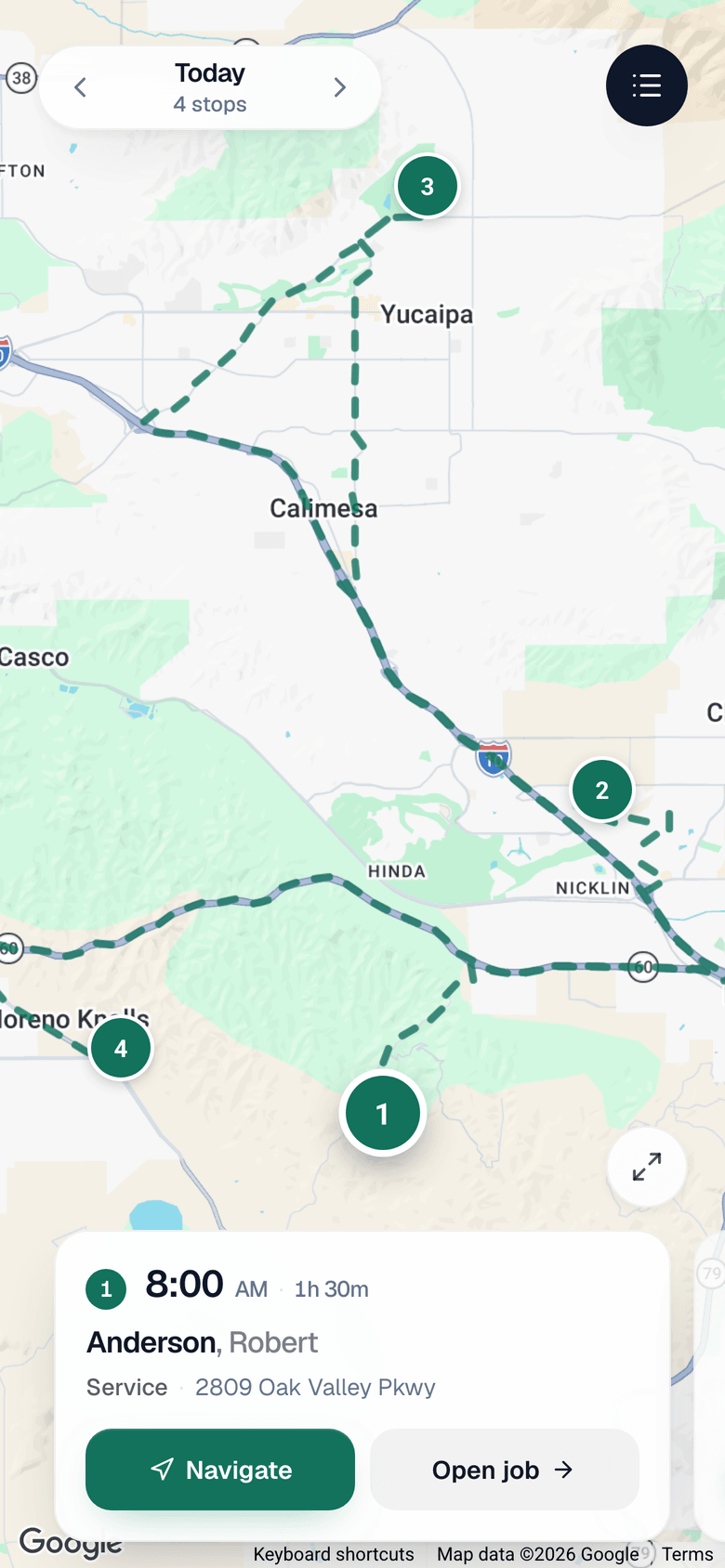
The Run a Call tech app showing one technician's route for the day: four stops mapped in order, with the first job and a Navigate button

Here’s us, plain and simple.

One flat price

Every user and every feature included. Nothing bolted on later.

No contract, no setup fee

Month to month. Cancel any time, export your data any time.

Moved over for you

We move customers, equipment, price book and memberships from your old login.

Built by the people who answer

Written and supported in-house. You get their direct line, not a ticket queue.

  • I have like three programs that are doing all that this one program is doing?
    Dan M.
  • No, this is amazing. You guys have to do more advertising.
    Jeff R.
  • I like the way it’s laid out. It’s really easy to use.
    Mitchell W.
  • I like it. So, what do I got to do?
    Tristan G.
  • I love the simplicity of it, just transparency.
    Matthew N.
  • This system looks pretty simple.
    Jerry B.
  • Everything was straightforward. Simple for the tech, simple for the office.
    Emanuel R.
  • I’m great at fixing air conditioners, you guys are obviously really good at what you do.
    Michael M.
  • Man, I need that.
    Lorne G., on equipment history
  • Beautiful, perfect. I will tell you, that’s a very nice feature, bro.
    John P.

Owners and office managers, on walkthrough calls with us

Everything an HVAC shop needs. Nothing it doesn’t.

Your phones, texts, and after-hours answering, inside the job.

A call comes in and the customer's history, equipment, and balance are already on screen. After hours, the AI receptionist books the call and leaves you the transcript. Texts get answered too, by an AI that knows your prices, hours and policies because you wrote them, and hands the thread to a person the moment it should.

See it in the productHow texting works

Run a Call on a phone. Barbara White calls in and her card shows six past jobs, a Carrier system, and an overdue balance. Jorge answers, opens her record and books a service call for Tuesday at 8 AM. That night the AI receptionist answers Joseph Harris and books him for Tuesday morning, transcript attached.

Let Runny balance today’s board.

The dispatch board for HVAC shops that have stopped hand-placing every call.

An animation of the Run a Call dispatch board. A dispatcher types a request to balance the day and presses send. Six unassigned calls on the left are matched one by one to four technicians on the right, each match showing its reason: the certifications the job needs, the drive from that technician’s other stops, how much is already booked, and whether the customer has a regular technician. The matched calls then land on the board as proposals the dispatcher still has to accept.

  1. 01
    Unassigned calls pile up in the queue.

    No-cools, tune-ups, a callback. Somebody has to place all of them before the trucks roll.

  2. 02
    Ask Runny to balance today’s board.

    It reads certifications, location, and who is actually free, then lays every call on the board in seconds.

  3. 03
    Nothing moves until you say so.

    Each placement shows up as a dashed card with the reason it went to that tech. Apply them all, or drag any one somewhere else.

See it in the product

Refrigerant and equipment tracked on every job.

Your tech logs the pounds and the unit from the app. The customer's equipment history and your refrigerant report fill in on their own, so nobody is digging through old work orders.

  • EPA 608 log, attached to the unit and the job
  • Every unit’s history on the customer file
  • Serial numbers, install dates, warranties

A technician photographs the data plate on a condenser. The type, brand, model number, serial number, install date and filter size read themselves off the photo into the equipment record, and then refrigerant is logged against that unit for the EPA 608 report.

Reports that tell you which tech is making you money.

Average ticket, close rate, and profit per job, per tech, without pulling four reports.

Four separate reports merge into a single technician scorecard. Each technician has a row showing average ticket, close rate and profit per job, counting up in place. The strongest and the weakest technician are marked.

Average ticket

Per tech, per month, without exporting anything.

Close rate

Who turns a diagnostic into a sale, and who needs a ride-along.

Profit per job

Labor, parts, and margin on every finished job. Three techs on one job still count once.

See it in the product

Memberships priced by what is on the roof.

A house with two systems and a shop with five are not the same plan. Yours attaches to the equipment, not the address.

See it in the product

The same maintenance plan priced on two different buildings. A house with two systems comes to $37 a month. A dental office with five rooftop units comes to $82 a month. The plan charges a price for the first system and a smaller price for each one after, so it attaches to the equipment rather than to the address.

The same maintenance plan priced on two different buildings. A house with two systems comes to $37 a month. A dental office with five rooftop units comes to $82 a month. The plan charges a price for the first system and a smaller price for each one after, so it attaches to the equipment rather than to the address.

Priced per system

A first price, a smaller one for each system after, and a cap if you want one.

Your tech sees the plan

The badge is on the job before he quotes, with the plan name and the member rate.

Renewals bill themselves

The renewal invoice goes out ahead of the date, and autopay charges the card on file.

Simple enough for the guys.

On my way, arrived, checklist, photos, refrigerant, estimate, collect. One screen per step, big buttons, and it keeps working with no signal.

If I couldn’t look at it and start navigating it within about five minutes without getting pissed off, it was no good. As soon as I got into yours, I was able to flow right through it.
Michael M.
I love the user interface. It’s not near as busy as HouseCall Pro.
Zachary S.
Download on theApp Store
Get it onGoogle Play

The Run a Call tech app, Timesheet tab. The tech taps Clock in and the timer starts. They tap Supplies to log what they are on, then End my day to clock out.

And the rest, in the same flat price.

Map, drive times, one tap to Waze

See who is closest to the call before you send them. The tech taps once and Waze opens.

“My secretary can use that. She’s not real good on distances.”
Jon S.

Automations with real depth

Triggers, conditions, delays and actions across jobs, estimates and invoices. Built for shops that want more than a reminder text.

  1. Estimate viewed
  2. Not approved after 2 days
  3. Text the customer
“I love this automation piece because that’s really like the bulk of everything that we’re trying to do.”
Emily F.

Price book, set up for you

We load your pricing before day one, so the guys quote from the book, not from memory.

“It’d be nice to steal somebody’s price book and just implement it and be like, okay, this is my price book.”
Macoy C.

Purchase orders and inventory

Raise the PO from the job, hand the number to the supply house, and it lands on the job cost.

“We click PO and we just give that PO number to the vendor and then everything links.”
John P.

Job costing

Materials, labor and margin on every job, without a spreadsheet.

“That is so much easier to measure job costs.”
Matthew N.

Pipeline and follow-ups

Every open estimate and parts-pending job in one list, so nothing falls through the cracks.

“My biggest struggle is remembering to get back to that job once the part comes in.”
Edward L.

On-my-way texts

One tap from the truck and the customer knows you are coming.

Good, Better, Best estimates

Three options, signed on the spot. Declined add-ons stay on the ticket.

Invoicing and Tap to Pay

Close out the invoice and take the card on the tech’s phone.

QuickBooks sync

Invoices and payments flow into QuickBooks on their own.

Time clock and payroll

Hours from the app, ready for payroll.

Online booking

Customers book from your website and it lands on the board.

Text us button

With Texting, one line of code on your website. The visitor’s message lands in your inbox as a text, and they get an answer in seconds.

Two-way texting

Text customers from the office or the truck, on one thread.

Google reviews

Every review in one place, reply drafts you approve before they post, and a review link texted when the job closes, credited to the tech who earned it.

Marketing attribution

See where the calls that turned into jobs came from.

Team chat

The office and the guys in one place, no group text.

Checklists and photos

Every step and every photo saved to the customer’s record.

Customer portal

Customers see their estimates and invoices online.

See every feature →

Hear it from shops like yours.

“The ease of use, the customer support is to me is the main thing. Getting the replies right away and just the practicality of the software. We just need to get the price out to the customer as soon as possible.”
Switched from Workiz
“Run a Call is the most responsive software company I have ever had to deal with. Problems get resolved in a very timely fashion, and we learn and grow together.”
Switched from FieldEdge
“I’d highly recommend Run a call a try, and I bet you’d be as happy as me - great thing”
Switched from Workiz
“This was the easiest platform to set up, and I’ve tried nearly 30 in 25 years. The others had high-pressure salespeople and felt like they’d never run a service call. Run a Call is built for HVAC by an HVAC guy, and you can tell. It just works.”
Eric BinkleyOwner · Hocha Cool
“You guys have done a really good job capturing what a smaller HVAC company actually needs.”
JP G.
“I like the AI booking. It dispatched based on where the jobs were and everyone’s ability.”
Jerry B.
“I like the tech scorecard. You’re not getting that out of Service Fusion, where you’re pulling four reports to figure it out.”
Katie S.
“As soon as I got into yours, I could flow right through it. Everything has a learning curve, but yours was really simple to get used to.”
Michael M.
“I love the user interface. It’s not near as busy as HouseCall Pro.”
Zachary S.
“I love your flat-rate model, and that it scales. That’s where you differentiate from everybody else who’s nickel-and-diming.”
Mary W.
“You’re the first person to ever add that to every job. They’re supposed to keep data logs on their trucks, and I can tell you, no one, no one.”
John P., on refrigerant logs
“The refrigerant report, the fact that you actually have that built in? Freaking hallelujah.”
Katie S.

Switching takes you an afternoon, not a season.

We move your customers, equipment, price book and memberships from your old login. Usually in a day. You never stop running calls.

Book my walkthroughStart the free trial instead
“Other companies worked at it for weeks and couldn’t do it. You migrated us in one day.”
Jason N.

What owners ask before they sign up.

3 to 5 days for most shops. We do the migration for you: customers, history, and price book. You send us the login, we handle the rest.

That's when most shops switch, because that's when the old system hurts most. We do all the data work, your techs learn the app in a day, and you never stop running calls.

There isn't one. Pay monthly, cancel any time, no penalty. We'd rather earn it every month than trap you in a contract.

Yes, that's exactly who we built the app for. Large tap targets, no nested menus, big font, works on the cheapest Android. Most techs run a full job, including taking payment, within 20 minutes of picking it up.

The app works fully offline. Job details, photos, notes, and payment capture all keep working, and it syncs the moment the phone reconnects.

No. Port your number over and keep your desk phones, or keep your current provider and use Run a Call for texting only. Either way every call and text lands on the customer's file.

You can export everything, any time, with no one's permission. And we put it in writing: if Run a Call ever shuts down, we pay to move you to another platform.

Two-way sync with QuickBooks Online. Invoices, payments, and customers stay in lockstep.

Yes. Start the free trial, no card required. Or book a demo if you'd rather have a guided walkthrough. Many shops run one or two techs on Run a Call next to their old system for a couple of weeks before cutting over.

Hand us your old login. We’ll have you running on it this week.

Start my free trialBook a walkthrough
No contract · No onboarding fee · We do the migration
Download on theApp Store
Get it onGoogle Play